

A grip strength app measures hand force, logs it over time, and turns raw numbers into readable trends. The most reliable results come from an app paired with a validated dynamometer, such as DEXDIA GX running on the GripMeter app, rather than a stopwatch and guesswork. If you don't have a device yet, a full-featured manual-logging app still beats no tracking at all, though the data will carry more error.
TL;DR:
- Using a validated dynamometer like the DEXDIA GX with GripMeter provides the most accurate, consistent grip strength data over manual logging or guesswork.
- Apps that support Bluetooth connection with a dynamometer automatically record session data, reducing transcription errors and capturing detailed force curves.
- Export capability, ideally in CSV format, is essential for ensuring data can be reviewed or shared with clinicians, especially for rehabilitation or performance tracking.
- Prioritize measurement accuracy and device compatibility over community features or gamification, as trustworthy data forms the foundation for progress assessment.
- Customizable programs that allow variable targets and session modifications are critical for tailoring training or rehab to individual goals and needs.
Table of Contents
- How Do Grip Strength Apps Measure and Track Data?
- How to Choose the Right App for Your Goal
- Features That Make Training Progress Measurable
- Training Protocols You Can Log in an App
- Best Practices for Accurate Grip Measurement
- Why Pairing a Validated Dynamometer With an App Improves Measurement
- User Interface Design Across Different Users
- How Grip Apps Handle Health Data Privacy
- Connecting Grip Data to Your Broader Fitness Ecosystem
- Customizing Training Programs for Your Specific Goals
- What We'd Prioritize First if We Were Starting Today
- Try the Grip Strength Calculator and DEXDIA GX
- Sources
How Do Grip Strength Apps Measure and Track Data?
Grip strength apps fall into two categories based on how the number gets into the app in the first place. That distinction shapes everything downstream, from accuracy to what you can eventually export to a clinician.
Automatic device logging pulls a reading directly from a connected dynamometer over Bluetooth. GripMeter does this with the DEXDIA GX, recording the full session, not just a single squeeze, so the app captures force curves rather than a rounded estimate. Manual input, by contrast, asks you to read a number off a separate device or a hand dynamometer and type it in. It works, but it introduces transcription errors and tends to skip the finer detail, like how force decayed across a hold.
Once the data is in, most apps capture a similar set of measurement types:
- Peak force per grip, usually in kilograms or pounds
- Hold duration for isometric or endurance tests
- Repetition counts for repeater-style protocols
- Separate left-hand and right-hand entries for symmetry tracking
From there, analytics vary more by app tier than by category. Common outputs include trend lines across weeks or months, left-right symmetry percentages, percentile ranking against normative data, and CSV export for anyone who needs to hand results to a coach or therapist. Squegg, for example, pairs per-hand tracking with gamified activities and downloadable graphs, showing how the same core data can serve very different training styles.
How to Choose the Right App for Your Goal
The single biggest mistake people make when picking a grip strength app is choosing based on star ratings instead of their actual job to be done. A climber chasing a new personal best and a physical therapist tracking a patient's post-surgery recovery need different features from the same category of app.
Start by defining your primary use case, then work through this checklist:
- Name the job. Rehab and clinical tracking demand exportable, date-stamped history. Athletic training rewards progression tools and PR tracking. Casual users often just want a simple, engaging way to stay consistent.
- Confirm device compatibility. If you own or plan to buy a dynamometer, check that the app supports Bluetooth pairing with that specific device before you download it. A mismatch means manual entry, which defeats the purpose of owning a smart device.
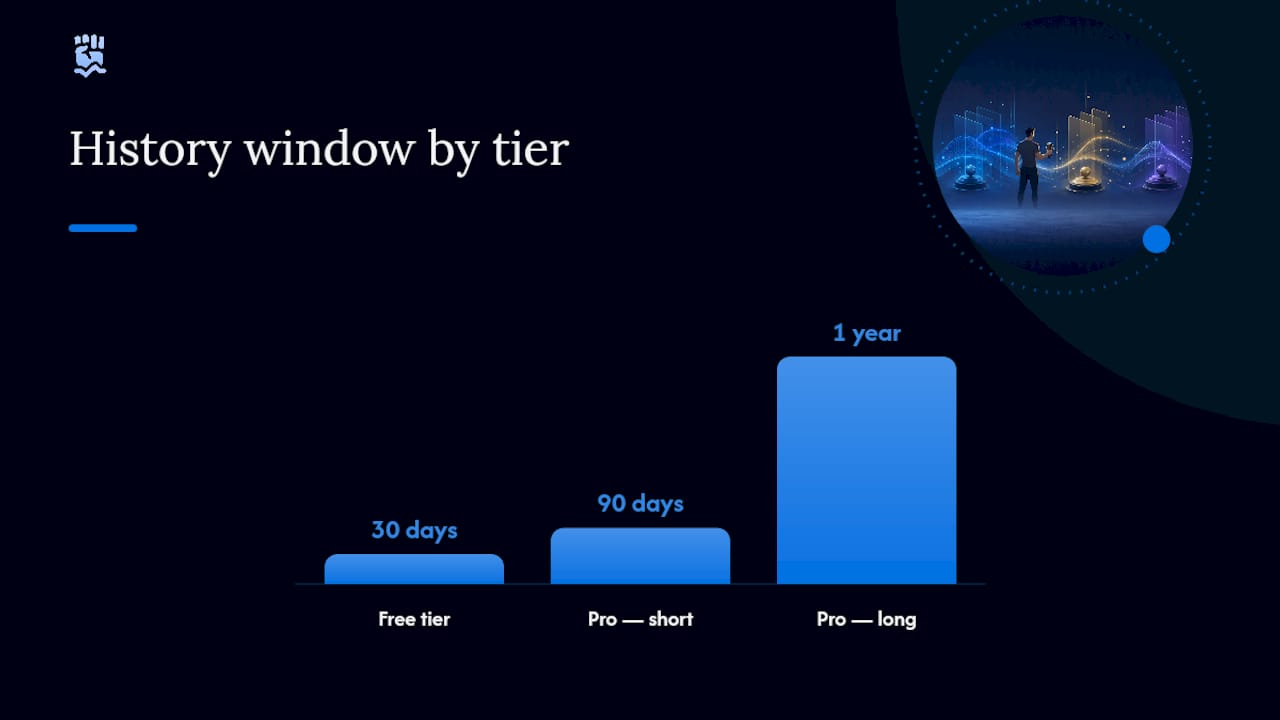
- Check the history window. Some platforms cap free history at 30 days, which is fine for a short program but may be insufficient for tracking a longer rehab arc.
- Look for CSV export. If you will ever share data with a clinician or coach, export capability isn't optional.
- Weigh free versus Pro honestly. Many grip apps use a freemium structure: free tiers often support a handful of devices and roughly 30 days of history, while Pro unlocks 90-day, 1-year, or all-time history plus export. If your goal spans months, budget for the upgrade from day one.
Pro Tip: Test the export function before you commit to a training block. An app that logs beautifully but exports a broken or incomplete CSV will cost you weeks of usable data later.
Features That Make Training Progress Measurable
Logging a number once a week tells you almost nothing. Measurable progress requires features that turn scattered readings into a pattern you can act on.
Guided programs are the biggest differentiator between a testing app and a training app. Some platforms, like Gripp, build in level-buster protocols and daily challenges designed to push past plateaus rather than just record them. Session logging matters just as much: built-in timers for holds, separate per-hand entry fields, automatic PR flagging, and running volume totals all reduce the friction between doing a set and having usable data from it.
Beyond raw logging, look for:
- Weekly or monthly progress summaries with visual charts
- Exportable session reports for coaches or clinicians
- Community leaderboards or streaks for accountability
- Offline-first logging so a bad Wi-Fi day doesn't cost you a data point
Community and gamification features measurably improve adherence for non-clinical users, while clinicians tend to prioritize exportable, validated data over streaks or badges. Neither camp is wrong. They're optimizing for different outcomes, and the best apps let you dial either emphasis up or down.
Training Protocols You Can Log in an App
Most grip work fits into three formats, and any capable app can track all three without extra setup.
- Dead-hang progression. Log a bar or bottom-hang duration weekly, recording total hang time and rest between attempts. Track the trend, not the single best day, since hang time swings with sleep and fatigue.
- Timed-hold and repeater sets. For strength, log 3 to 5 sets of 10-second maximal holds with 60 to 90 seconds of rest. For endurance, log repeater sets of 7 seconds on, 3 seconds off, for multiple rounds.
- Progressive overload tracking. Increase hold duration, added load, or rep count only when the app's trend line shows a plateau of two or more sessions at the same output.
Left-right symmetry deserves its own attention, particularly after an injury or for anyone doing asymmetric sports like climbing or rowing. Log both hands every session rather than alternating weeks.
For technique on the dead-hang itself, Gripnatic's breakdown of dead-hang progressions covers grip positioning and pacing in more depth than most apps do in-app.
Pro Tip: Log the rest interval, not just the working set. A shrinking rest period between identical hold times is often the earliest sign of a real strength gain, and it shows up in your data weeks before your max grip number moves.
Best Practices for Accurate Grip Measurement
Bad technique produces bad data no matter how good the app is. Standardized posture and handle position matter more than most casual users assume: seated, elbow at 90 degrees, wrist neutral, and the handle set to a consistent width session to session.
- Warm up with two or three submaximal squeezes before recording a real trial
- Take three trials per hand with 30 to 60 seconds of rest between them
- Record the maximum trial for strength tracking, and the mean for fatigue or endurance protocols
- Cross-check a manual reading against the app's device-recorded number occasionally to confirm agreement
A three-trial protocol with rest intervals is the standard most clinician-facing guides recommend, and skipping the warm-up trials is the single most common reason home-tested grip numbers run inconsistent from one week to the next.
Why Pairing a Validated Dynamometer With an App Improves Measurement
A general fitness app measures effort. A validated dynamometer paired with an app measures force, and the difference shows up the moment you try to compare a reading from March against one from November.
GripMeter connects directly to the DEXDIA GX, and that pairing is deliberate: automatic logging removes the transcription step, while the app layers on left-right symmetry analysis and percentile ranking against normative data. Kinesiologists and physical therapists working with athletes use these tools specifically because CSV export slots grip data straight into a broader assessment file, no manual re-entry required.
A general-purpose app is fine for casual tracking. Once the goal is rehab progress, return-to-sport clearance, or comparing an athlete against normative percentiles, a validated device stops being optional and becomes the baseline for trustworthy data.
Casual training tolerates more measurement noise. Clinical and performance work does not.
User Interface Design Across Different Users
A teenager training for a climbing competition and a 68-year-old tracking recovery after a wrist fracture will use the same app very differently, and interface design has to account for both without alienating either.
Larger tap targets and higher-contrast text matter more than most designers assume for older users or anyone with reduced fine motor control, which, ironically, includes a meaningful share of the rehab population a grip app is built to serve. Simple, linear logging flows, one screen, one input, one confirmation, tend to outperform dashboard-heavy designs for this group. Younger, performance-focused users generally tolerate more visual density: leaderboards, streak counters, and multi-metric dashboards read as motivating rather than cluttered to someone already comfortable with fitness-tracking interfaces.
The practical takeaway is that a single interface rarely serves both extremes well. The strongest grip apps offer a simplified logging view by default and let advanced users opt into denser analytics, rather than forcing everyone through the same screen. Font-size controls, voice-guided prompts, and one-tap logging (skipping multi-step entry forms) all reduce friction for anyone managing a hand injury, where finger dexterity is often the exact thing being rehabbed. If you're recommending an app to a patient or an older relative, test the logging flow yourself first. A confusing interface doesn't just annoy someone. It produces missed sessions and gaps in the very data you're trying to build.
How Grip Apps Handle Health Data Privacy
Grip strength readings count as health-adjacent data, and that classification should shape which apps you trust with your information. A single grip score in isolation reveals little, but months of trend data tied to a name and a rehab timeline is a different privacy consideration entirely.
Before syncing an app to a dynamometer, check three things: whether the app stores data locally versus in the cloud, whether it requires an account tied to your real identity or allows anonymous or pseudonymous use, and whether its privacy policy explicitly states if data is shared with third parties for advertising. Reputable clinical-adjacent apps typically default to local storage or encrypted cloud sync with no ad-network sharing, since their user base includes patients whose data has genuine sensitivity.
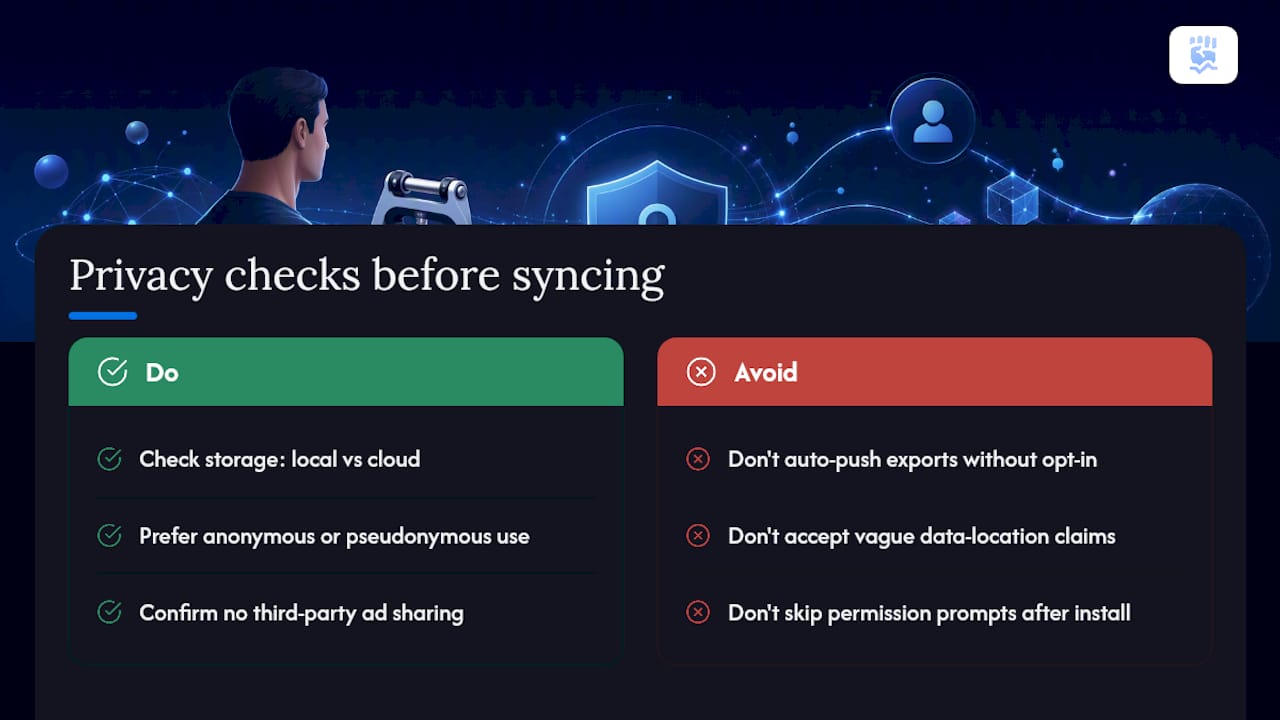
Export features deserve their own scrutiny. A CSV export you control and send yourself to a therapist is very different from an app that automatically pushes your data to a connected platform without a clear opt-in. Read the permission prompts the first time you install rather than tapping through them, and revisit an app's privacy settings after major updates, since default sharing settings sometimes reset. If an app is vague about where your data lives or who can see it, that vagueness itself is the warning sign, regardless of how polished the tracking dashboard looks.
Connecting Grip Data to Your Broader Fitness Ecosystem
Grip strength rarely exists in isolation from the rest of someone's training or recovery picture, and the more useful apps recognize that by connecting to broader health platforms rather than operating as a walled garden.
Some grip apps sync with general fitness platforms to log grip sessions alongside strength training, cardio, or sleep data, giving a fuller picture of recovery and readiness. This matters most for athletes managing training load, since a grip strength dip sometimes shows up as an early signal of accumulated fatigue before it appears anywhere else. For rehab patients, the more valuable integration is often with a clinician's own record system rather than a consumer fitness platform, which is where CSV export earns its keep again: a therapist can drop your exported grip history straight into a patient file without you needing a shared account on any particular ecosystem.
Not every app needs deep third-party integration to be worth using. A tightly built, standalone grip app with clean CSV export can hand off data to almost anything downstream, spreadsheet, clinician software, or a coach's own tracking sheet, without needing a formal API partnership. When you are comparing apps, weigh native integrations against export flexibility rather than assuming more connected platforms automatically means better data portability.
Customizing Training Programs for Your Specific Goals
A single fixed program rarely fits both a rock climber chasing crimp strength and a stroke survivor rebuilding basic hand function, which is why customization options matter as much as raw tracking accuracy.
Look for apps that let you set your own targets rather than only offering preset programs. Useful customization typically includes adjustable rest intervals between sets, the ability to define your own hold-duration targets instead of accepting a generic default, and separate progression tracks for each hand when recovering from a unilateral injury. Some training-focused apps build in level-buster style progression that automatically adjusts difficulty based on your recent trend line, which suits performance athletes well but can feel aggressive for someone in early-stage rehab who needs a gentler, clinician-set pace instead.
Rehabilitation needs, in particular, benefit from programs that can be modified session to session based on pain response or fatigue, rather than a rigid weekly template that assumes steady linear improvement. Athletic goals tend to tolerate more standardized progression, since the underlying tissue isn't compromised. The practical test for any app's customization claims is simple: can you change a single variable, like target hold time or rest period, without resetting your entire program? If the only options are prebuilt templates with no adjustable fields, the app is optimized for casual users, not for anyone managing a specific rehab timeline or a sport-specific strength goal.
What We'd Prioritize First if We Were Starting Today
Most guides to grip strength apps treat every feature as equally important, when in reality the order of priority should be measurement accuracy first, everything else second. Gamification, leaderboards, and slick dashboards are nice, but they're worthless layered on top of a number that isn't trustworthy in the first place.
The conventional advice tends to push people toward whichever app has the best reviews or the most polished interface. That's backward. The first question should be whether the app can pair with a validated device and whether it exports usable data, because those two features determine whether your training decisions three months from now are based on real signal or noise.
If we were starting from zero, we'd prioritize device compatibility and CSV export before comparing training programs or community features. Get the measurement right, confirm left-right symmetry is being tracked accurately, and only then start layering on progression templates or gamified consistency tools. Data quality is the foundation. Everything else built on top of shaky numbers just compounds the error.
— Dexdia Team
Try the Grip Strength Calculator and DEXDIA GX
If you just ran your first test, the fastest way to make sense of the number is Dexdia's Grip Strength Calculator, which compares your result against normative data by age and sex so you know whether you're tracking a strength, an average, or a gap worth addressing.
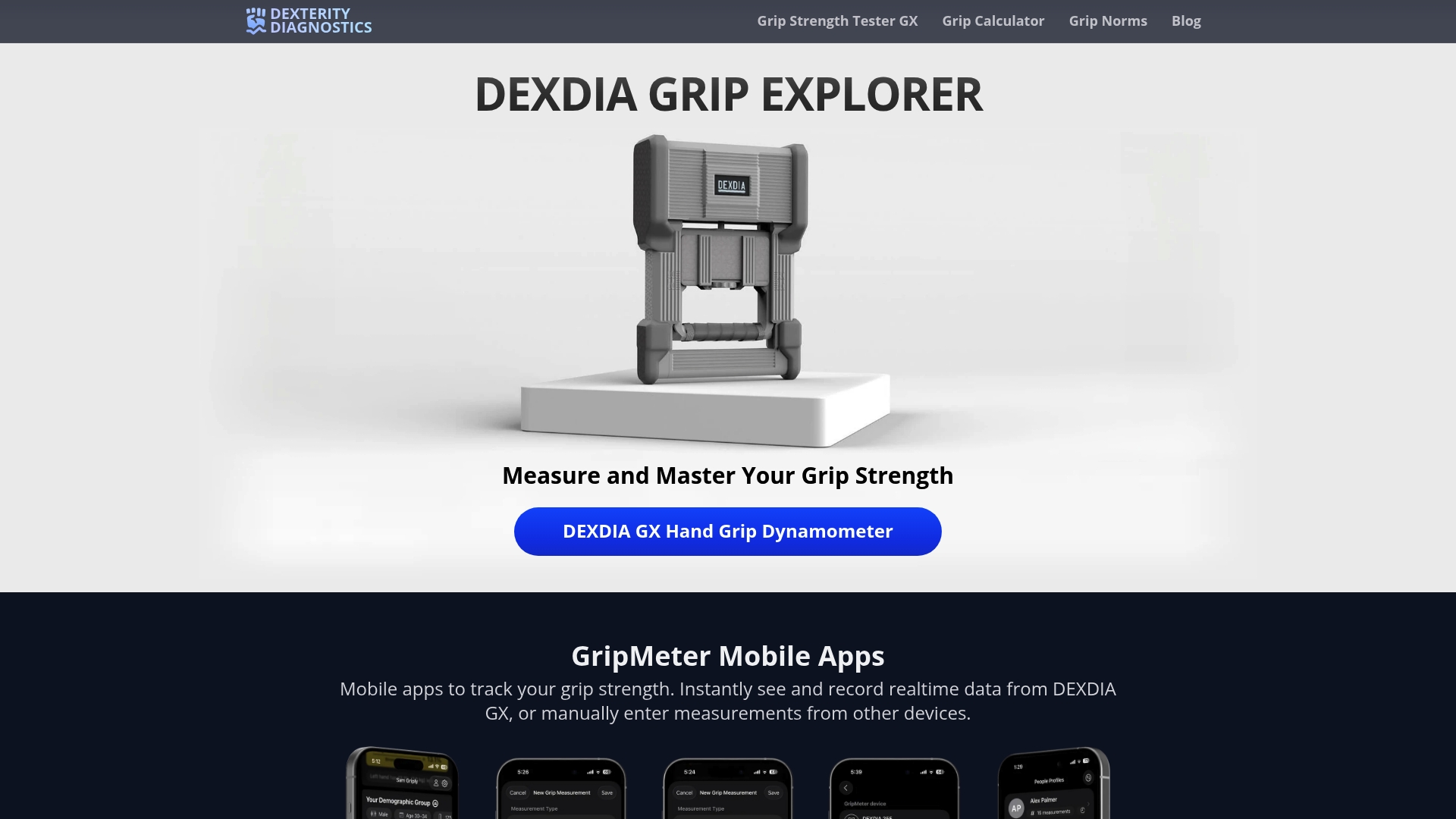
For anyone serious about training or rehab progress, a general fitness app paired with a rough manual reading only gets you so far. The DEXDIA GX pairs directly with the GripMeter app for automatic per-hand logging, symmetry analysis, and percentile ranking, so every session builds on real, comparable data instead of estimated squeezes. Test your grip today, export your first session as a CSV, and share it with your coach or therapist so your next training block starts from an actual baseline instead of a guess.